Turn historical tables into structured data
Transkribus Table Models use instance segmentation to detect rows and columns in document images, extracting tabular data into spreadsheets with unmatched accuracy.
Start training your model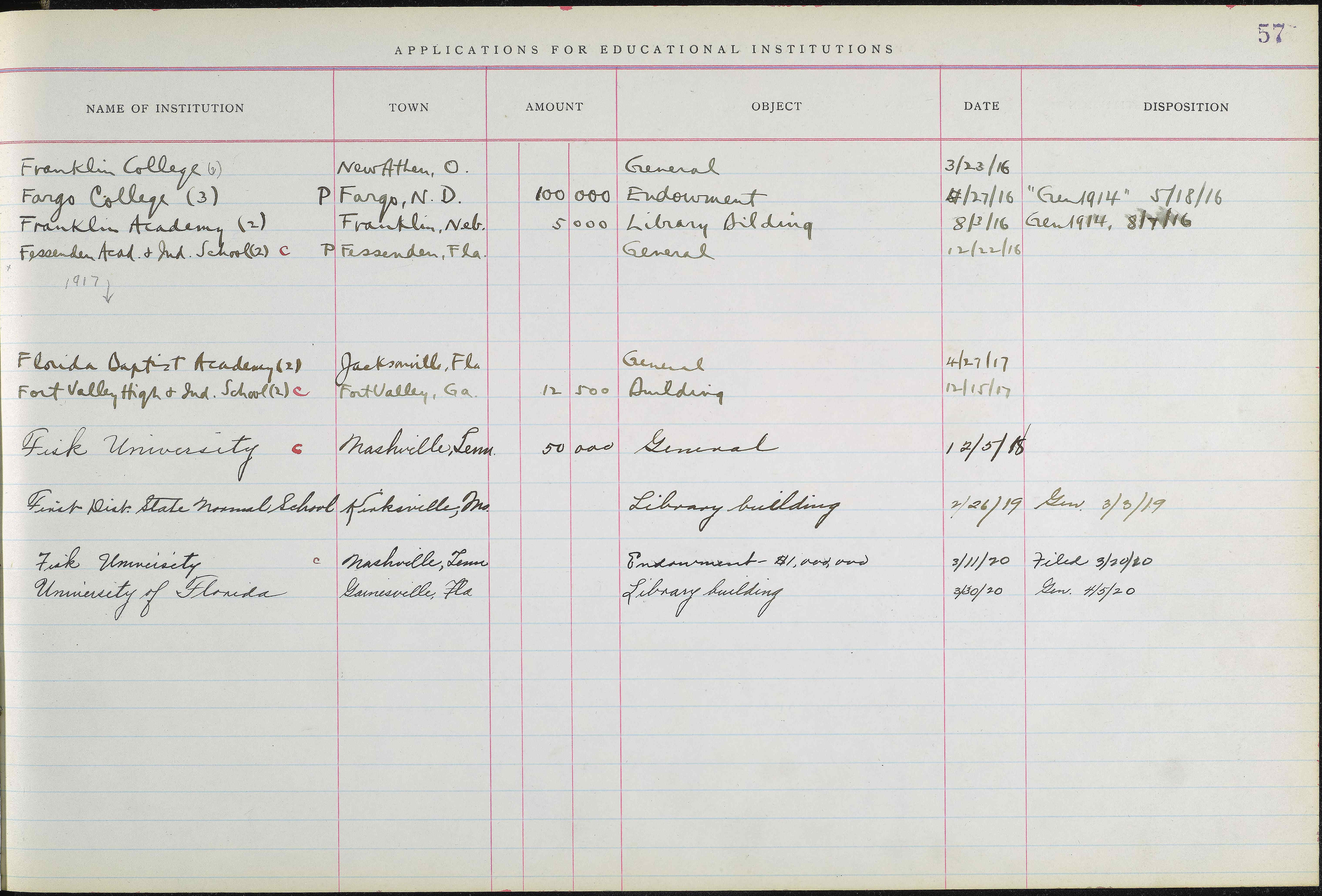
See the extraction in action
Table Models detect the grid structure of your document and extract each cell's content into a structured spreadsheet you can export.
| Institution | Town | Amount | Object | Date | Disposition |
|---|---|---|---|---|---|
| Franklin College (6) | New Athen, O. | General | 3/23/16 | ||
| Fargo College (3) | Fargo, N.D. | 100,000 | Endowment | 4/27/16 | Gen 1914, 5/18/16 |
| Franklin Academy (2) | Franklin, Neb. | 5,000 | Library Building | 8/3/16 | Gen 1914, 8/7/16 |
| Fessenden Acad. & Ind. School | Fessenden, Fla. | General | 12/22/16 | ||
| Florida Baptist Academy (2) | Jacksonville, Fla. | General | 4/27/17 | ||
| Fort Valley High & Ind. School | Fort Valley, Ga. | 12,500 | Building | 12/15/17 | |
| Fisk University | Nashville, Tenn. | 50,000 | General | 12/5/18 | |
| First Dist. State Normal School | Kirksville, Mo. | Library Building | 2/26/19 | Gen. 3/3/19 |
Built for every type of tabular document
From membership rolls to census records, Table Models handle the full spectrum of historical tables with consistent accuracy.
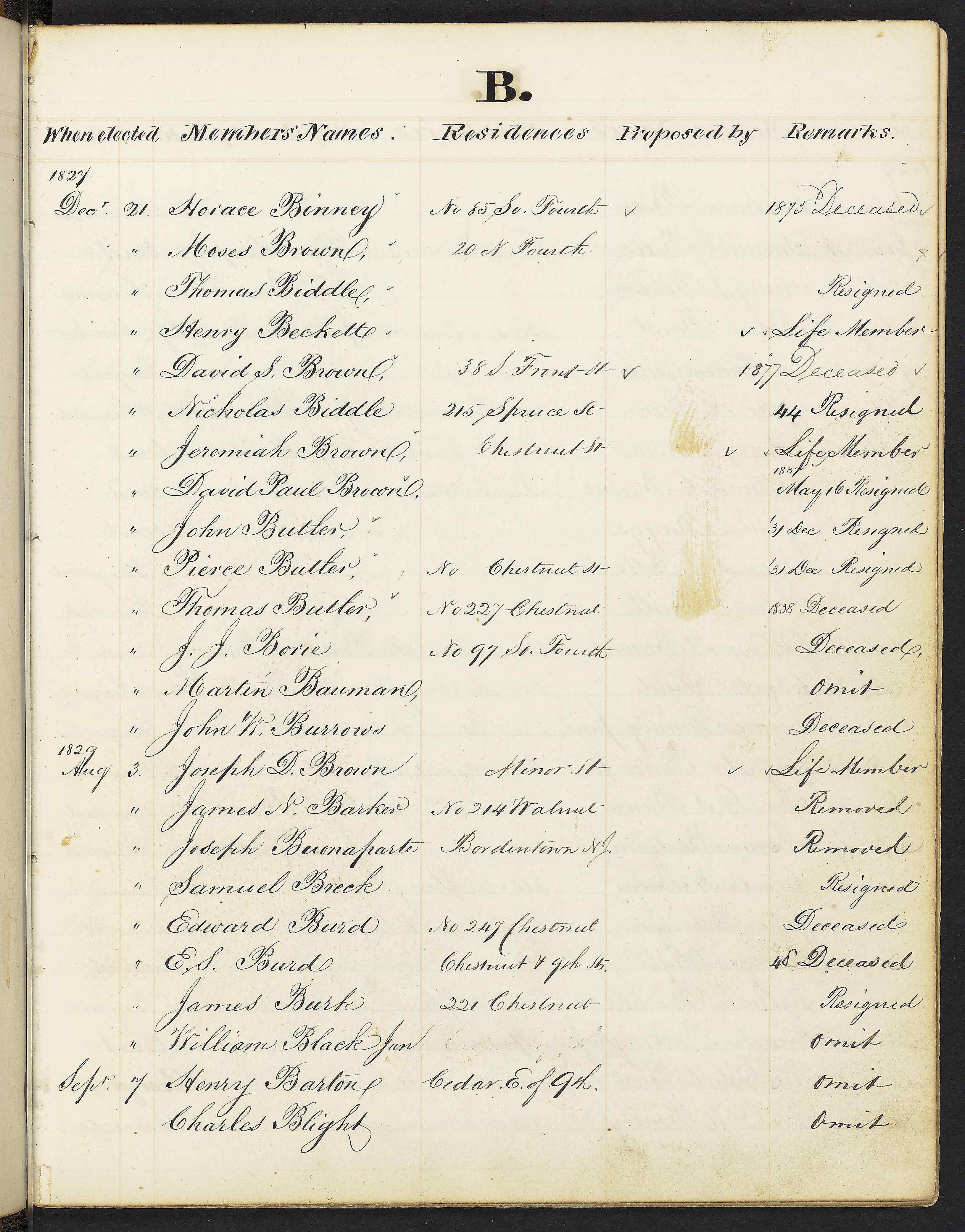
Membership registers & ledgers
Handwritten membership rolls, society registers, and financial ledgers with clearly defined columns. Table Models excel at these uniform grid structures, accurately detecting rows and columns even when handwriting varies significantly between entries.
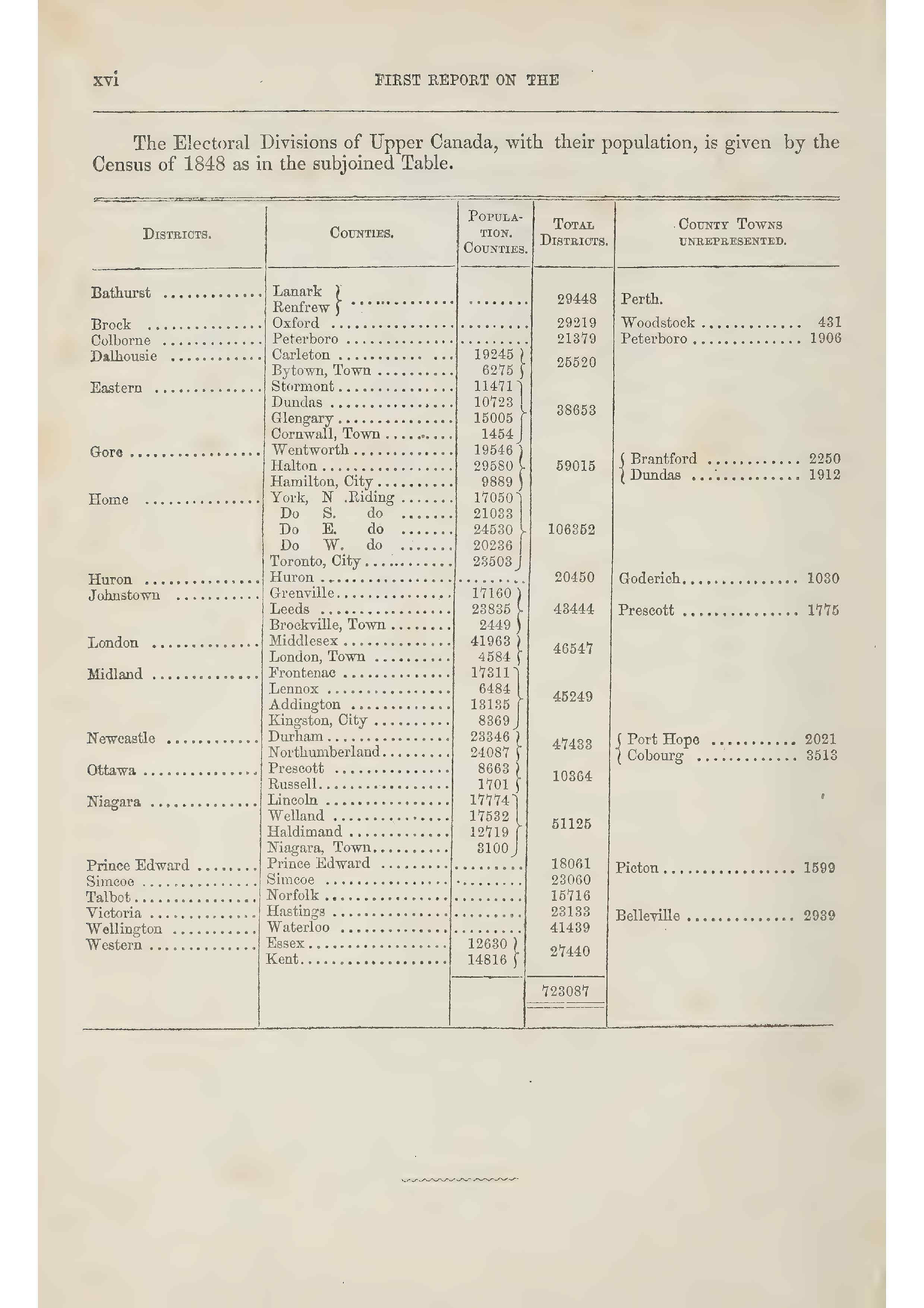
Census & statistical tables
Printed census forms, population surveys, and statistical tables with complex headers. Even pre-printed forms with fine grid lines are handled reliably, turning pages of demographic data into usable spreadsheets for large-scale analysis.
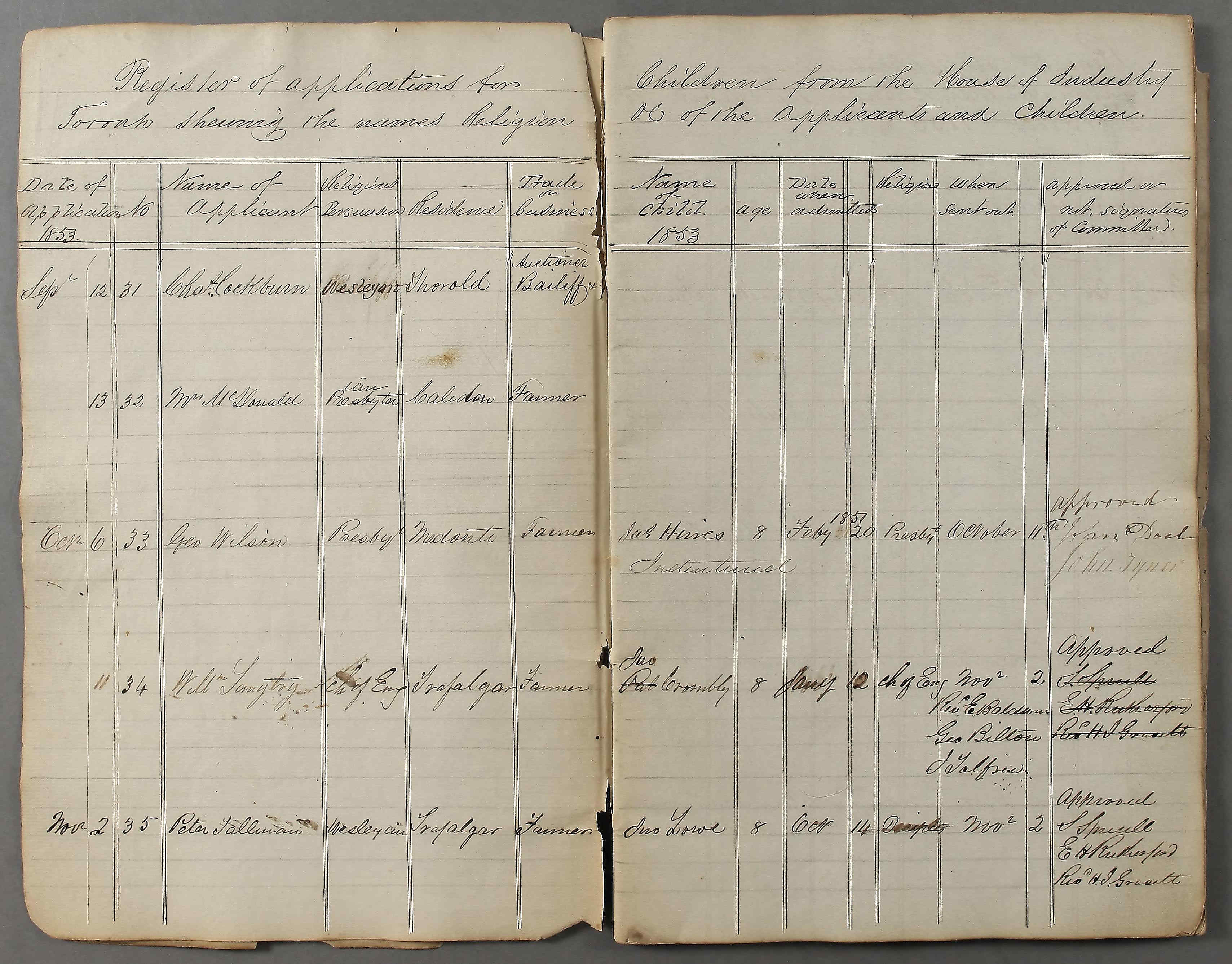
Multi-line entries & skewed rows
Application registers and verbose records where cells contain multiple lines of text. Table Models handle multi-line content within cells naturally, and even skewed or rotated row separators are detected correctly thanks to instance segmentation.
Administrative & institutional tables
Educational records, financial statements, and administrative tables with many columns of handwritten data. Whether your table has 3 columns or 30, Table Models scale to recognise the structure accurately across hundreds of pages.
Structured output, ready to use
Every detected cell is mapped to its row and column position, giving you clean structured data you can export directly.
<TableRegion id="t1">
  <Coords points="0,646 0,4014 6060,4013 6060,638"/>
  <TableCell row="0" col="0">
    <Coords points="0,646 0,822 1548,822 1548,644"/>
    <TextLine>
      <Unicode>Franklin College (6)</Unicode>
    </TextLine>
  </TableCell>
  <TableCell row="0" col="1">
    <Coords points="1548,644 1548,822 2241,822 2241,644"/>
    <TextLine>
      <Unicode>New Athen, O.</Unicode>
    </TextLine>
  </TableCell>
  <!-- ... -->
</TableRegion>| Institution | Town | Amount | Object | Date | Disposition |
|---|---|---|---|---|---|
| Franklin College (6) | New Athen, O. | General | 3/23/16 | ||
| Fargo College (3) | Fargo, N.D. | 100,000 | Endowment | 4/27/16 | Gen 1914 |
| Franklin Academy (2) | Franklin, Neb. | 5,000 | Library Building | 8/3/16 | Gen 1914 |
| Fessenden Acad. | Fessenden, Fla. | General | 12/22/16 |
Export your tables in multiple formats
How Table Models work
A three-step pipeline transforms your document images into structured tabular data.
Table Structure Recognition
Two instance segmentation models run in parallel: one detects horizontal row separators, the other detects vertical column separators. The results are merged into a complete grid structure.
Text Line Detection
Within each detected cell, text baselines are identified. This step handles multi-line cells naturally, detecting every line of text regardless of cell height.
Text Recognition
An HTR model reads the detected text lines and produces the final transcription. The result is a structured spreadsheet with each value mapped to its row and column.
| Institution | Town | Amount | Object | Date | Disposition |
|---|---|---|---|---|---|
| Franklin College (6) | New Athen, O. | General | 3/23/16 | ||
| Fargo College (3) | Fargo, N.D. | 100,000 | Endowment | 4/27/16 | Gen 1914 |
| Franklin Academy (2) | Franklin, Neb. | 5,000 | Library Building | 8/3/16 | Gen 1914 |
How to train a Table Model
Table Models are not pre-built — you train them on your specific documents. Here is what that looks like.
Annotate your tables
Open your documents in Transkribus and draw the row and column structure on each page. Mark every row separator and column separator so the model can learn your specific table layout.
Train
Once you have annotated around 20 pages (more for complex layouts), submit them to train your custom Table Model. Training typically takes a few hours.
Apply & iterate
Run your trained model on new documents — it automatically detects table structures and extracts cell content. Use the results to correct errors, add more training pages, and retrain for even better accuracy.
Train your own Table Model
Start with as few as 20 annotated pages and iteratively improve your model's accuracy.
For simple, uniform tables, 20 annotated pages are enough to train a first working model.
A Mean Average Precision of 35% or higher already delivers reliable table detection in practice.
Tips from the experts
- Start with simple, uniform tables and expand to more complex layouts later
- Exclude header rows during initial training to keep the structure consistent
- Use 50–100 pages for complex or mixed table layouts
- Iterate: train, evaluate, correct errors, retrain for best results
- Table Models work best for strict grid structures — for forms and irregular layouts, use Field Models instead
Table Models vs Field Models
Choose the right tool for your document structure.
Table Models
Best for uniform grid structures where data is organised in consistent rows and columns.
- Rows × columns grid detection
- Multi-line text per cell
- Skewed rows and columns supported
- Export as XLSX, CSV, PAGE XML
- Best for: registers, ledgers, census tables
Field Models
Best for complex layouts, forms, and documents where regions have irregular shapes.
- Tagged regions of any shape
- Irregular and overlapping areas
- Custom field types and labels
- Works for any document structure
- Best for: forms, letters, index cards
Start extracting tabular data today
Train a custom Table Model on your documents and unlock structured data from thousands of handwritten tables.