Skip to content
  • Pricing

Cursive to Text — Free AI Translator

Drop a photo of cursive handwriting — get editable text in seconds. No signup needed.

Free to tryNo signup neededWorks with photos100+ languages

Drag an image here

Select a file...

PNG or JPG up to 10 Mb

Wolpi
AI Assistant

By uploading an image, you accept our terms and privacy policy.

This demo uses Text Titan, our most powerful AI model. Create a free account to get 50 credits every month.

500 000+People use Transkribus
200+ MillionPages of cursive converted
300+AI models for different scripts
Free50 credits every month

How to convert cursive to text

Three steps — no software to install, no account required for the demo.

1

Upload a photo or scan

Drag a phone photo, scan, or screenshot of cursive handwriting into the box above. JPG, PNG, and PDF all work. No special equipment needed — a phone camera is enough.

2

AI reads the cursive

The AI analyzes your image, detects the text lines, and converts the cursive handwriting to digital text. It handles connected letters, faded ink, and messy handwriting that standard OCR cannot read.

3

Copy, edit, or export

Your text appears in seconds. Copy it to the clipboard, paste it into a document, or create a free account to export as TXT, DOCX, or PDF.

Yes, AI can read cursive

Trained on millions of handwritten words — not just printed text

Can AI read cursive? Yes — and Transkribus proves it. Standard OCR tools fail on cursive because they try to match individual characters against fixed templates. But cursive letters connect, overlap, and vary from one writer to the next. Transkribus uses neural networks trained on millions of handwritten words. The AI learned to read cursive the same way a human does: by recognizing patterns across entire words and lines, not individual letters.
Reads connected, overlapping, and irregular letter forms
Layout analysis detects lines, columns, and marginalia automatically
Handles faded ink, damaged paper, and low-contrast scans
Confidence scores let you assess accuracy for every line
Continuously improving — the AI gets better as the community contributes more training data
AI reading cursive handwriting — connected letters and historical scripts

Works from any photo

Phone camera, scan, or screenshot — it all works

You don't need a professional scanner to translate cursive. Take a photo with your phone, upload a scan from a library, or drop a screenshot — the AI handles different image qualities, lighting conditions, and paper types. Whether it's a letter from your grandmother or a court record from the 1700s, just upload the image and get text back.
Phone photos of letters, postcards, diaries, and notes
Archival scans from libraries and collections
Screenshots and cropped images
PDFs with scanned pages
Old, faded, or damaged documents with low contrast
Converting a phone photo of cursive handwriting to digital text

Cursive scripts

Old cursive, Kurrent, Sütterlin, copperplate — all supported

Cursive was the dominant handwriting style across Europe and the Americas for centuries. Millions of letters, diaries, court records, church books, and administrative documents were written in flowing, connected scripts that fewer and fewer people can read today. Transkribus has specialized AI models for all of them.
English cursive, copperplate, and running hand
German Kurrent and Sütterlin (1500s–1940s)
French, Italian, Spanish, and Dutch cursive styles
Administrative, legal, and ecclesiastical hands from any century
Russian cursive and Cyrillic handwriting
Personal letters, diaries, and family documents in any language
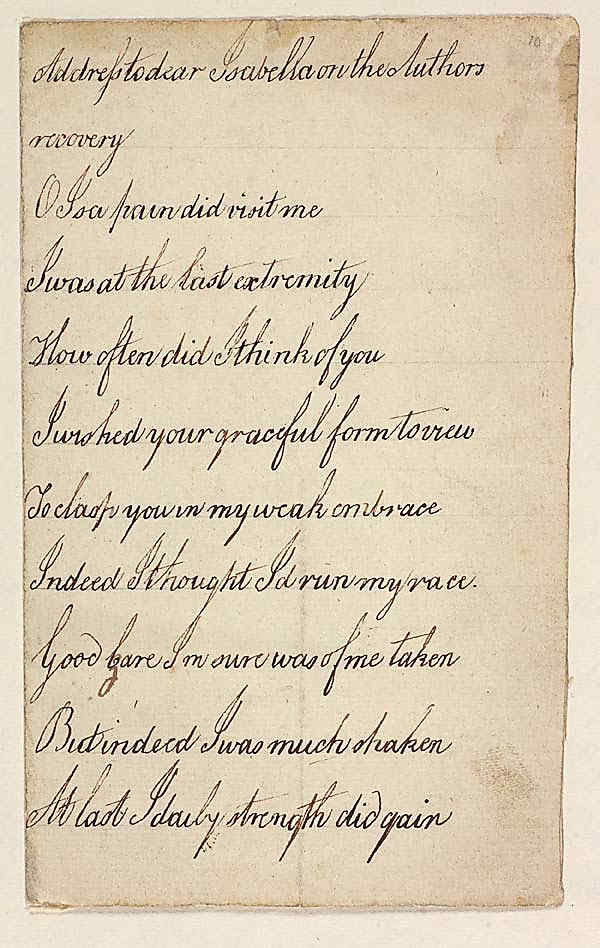
Document
Addres to dear Isabella on the Authors
recovery
O Isa pain did visit me
I was at the last extremity
How often did I think of you
I wished your graceful form to view
To clasp you in my weak embrace
Indeed I thought Id run my race
Good Care Im sure was of me taken
But indeed I was much shaken
At last I daily strength did gain

Cursive translator comparison

Transkribus vs. standard OCR for cursive

Standard OCR is designed for printed text. It fails on cursive because it tries to isolate individual characters — but in cursive, letters connect and overlap. Transkribus was purpose-built for handwriting recognition.

FeatureTranskribusStandard OCR
Cursive handwriting Yes No
Connected letter forms Yes No
Historical scripts (Kurrent, Sütterlin, copperplate) Yes No
Printed text Yes Yes
Works from phone photos Yes Limited
Custom model training Yes No
Layout analysis (columns, marginalia) Yes Limited
100+ languages Yes Limited
European hosting (GDPR) YesVaries

Comparison based on general-purpose OCR services. Capabilities may vary by provider.

300+ AI models

Specialized cursive models for every script and century

Every writer's cursive is different — and so are our AI models. The Transkribus community has trained over 300 public models for specific scripts, languages, and document types. Find one that matches your documents, or use Text Titan I, our flagship model that handles most cursive styles out of the box.
Text Titan I: general-purpose model for cursive and print in any language
Specialized models for Kurrent, Sütterlin, copperplate, and more
Community-trained models shared freely across the platform
Filter by language, century, and script type in the model catalog
Models improve continuously as more training data is contributed
Public AI models for cursive recognition — filter by language, script, and century

Batch processing

Need to convert hundreds of cursive pages?

The demo above is great for a quick translation of a single page. But if you have a collection — a box of family letters, a research archive, a stack of historical records — the full Transkribus platform lets you process them all at once. Upload entire folders, let the AI work through them, then search, edit, and export the results.
Batch upload — convert hundreds of cursive pages at once
Full-text search across all your converted documents
Built-in editor to correct and refine results
Export as TXT, DOCX, PDF, or structured XML
Train a custom model on your specific writer's handwriting for even higher accuracy
Transkribus platform for batch cursive to text conversion

Used by 500,000+ people and leading institutions

Your documents stay private.

Transkribus is built and hosted in Europe by a cooperative — not a Big Tech company. Your documents are processed securely and never used to train AI without your consent.

Your data stays yours

Documents and transcriptions belong to you. Delete anytime.

Processed in Europe

All documents are processed on our own servers in Austria. Fully GDPR-compliant.

No hidden costs

50 free credits every month. No credit card required to start.

Frequently asked questions about cursive conversion

Yes. Transkribus uses neural networks trained on millions of handwritten words to read cursive. Unlike standard OCR, which only works on printed text, our AI was specifically built to handle connected letters, varying handwriting styles, and historical scripts. You can try it right now — upload a photo at the top of this page and see the result in seconds, no signup needed.

Upload a photo or scan of the cursive handwriting to the demo at the top of this page. The AI reads the cursive and converts it to editable digital text. You can then copy the text, paste it into a document, or create a free account to export it as TXT, DOCX, or PDF. It works directly in your browser — no software to install.

Yes. The demo on this page is completely free to use — no account required. You can convert several pages of cursive right here. For larger projects, create a free account to get 50 credits every month (enough for about 50 pages). No credit card required.

Yes. Transkribus works with phone photos, scans, screenshots, and PDFs. You don't need a professional scanner — just take a clear photo with your phone camera and upload it. The AI handles different lighting conditions, paper types, and image qualities.

Transkribus supports virtually all Latin-script cursive styles: English cursive and copperplate, German Kurrent and Sütterlin, French, Italian, Spanish, and Dutch cursive, plus administrative and legal hands from any century. It also reads Russian cursive, Cyrillic handwriting, Arabic scripts, and many more — over 100 languages in total. There are 300+ specialized AI models for specific scripts and time periods.

Accuracy depends on the quality of the image and the handwriting. For clean scans and legible cursive, the AI typically achieves 95–99% character accuracy. Difficult handwriting, faded ink, or damaged paper may produce lower accuracy — but still far better than what standard OCR can deliver. You can also train a custom AI model on your specific writer's handwriting to improve accuracy further.

Yes — this is one of Transkribus' core strengths. The platform was originally developed for historical document research and has specialized AI models for scripts dating back to the 1500s. It handles old German Kurrent, Sütterlin, 18th-century copperplate, colonial-era American handwriting, and many other historical cursive styles that are difficult to read even for humans.

Standard OCR (like the text recognition in Google Drive or Adobe Acrobat) is designed for printed text. It works by matching individual characters against fixed templates — which fails on cursive, where letters connect and overlap. Transkribus uses a fundamentally different approach: handwriting-specific neural networks trained on millions of handwritten words. This is called HTR (Handwritten Text Recognition), not OCR.

Ready to convert your cursive documents?

Create a free account to process full collections, search across your text, train custom models, and export in any format.

50 free credits every month – No credit card required

200M+Pages converted
500K+Users worldwide
300+AI models